Inventory softwareNews about inventory  accounting softwareReviews of inventory management softwareFeatures of inventory control softwareInventory management softwarePrices of inventory software

1. Using of Bronze POS Inventory system

1.Introduction
1.1.What is Bronze Inventory System?
1.2. How to begin working with this inventory software?
1.3. System Requirements to this inventory tracking software
1.4. Installation Bronze inventory
2.Main Menu
2.1. New inventory Database
2.2. Open the inventory Database
2.3. Backup the inventory database
2.4. Restore the inventory database
2.5. Import from previous databases
2.6. Form's font for the inventory system
2.7. Report Wizard
2.8. Send
2.9. Security functions for the inventory management software
3. Company&Locations
3.1. Set up Your Company
3.2. Company Address
3.3. Email address
3.4. The other settings
3.5. Storage locations, warehouses
4. Vendors
4.1.The vendor List at the inventory system
4.2.Add a new Vendor to Bronze Inventory
5. Receiving
5.1.The Item receipt List at the inventory system
5.2.Add a new Item receipt to the inventory database
5.3. Edit an Item receipt at Bronze Inventory
6. Customers
6.1. The customer List at the inventory system
6.2. Add a new Customer to the inventory database
7. Invoices
7.1.The Invoice List at the inventory system
7.2.Add a new Invoice to the inventory database
7.3. Edit an Invoice at the inventory system
8. Point of Sale
8.1.Options of the Point of Sale panel
8.2.The Point of Sale Panel
9. Items
9.1.The Item List at the inventory system
9.2.Add a new Item to the inventory database
10. Transfer Orders
10.1.Add a new Transfer Order in the inventory system
11. Export and import
11.1.Export and import CSV files at Bronze Inventory System
11.2.Export and import Excel files at the inventory system
11.3.Bronze Inventory system and QuickBooks

Storage locations, warehouses

Golden Inventory is a multi locations system. This System can control any amount of warehouses. To add a new location click on the button "New" at the Company & Location form. Fill out the Location Edit form and click the button OK.
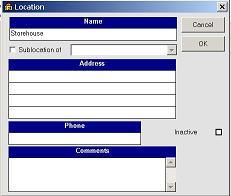
Storage location