

 |
        |
 |
 |
 |
1. Using of Golden Web Inventory system
|
 |
 How to install?For example, you have three warehouses. If somebody in New York, receives a product then another person in Sydney can know about it instantly. System keeps all information in the one database file. You can locate this file on your web server with system's ASP scripts. Then connect to this database from any computer with Golden Web Inventory System. The Golden Web is a fast desktop inventory program with powerful report and bar code features working as with local as with remote databases. Consider how we can create the inventory system for the company with two remote offices and sales reps. 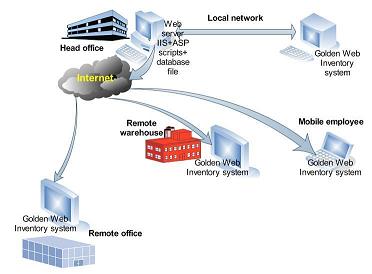
First of all, you have to download and install the Golden Web Inventory System on each your computer. Then put the main database file "invent.idb" in a shared folder on your server. Connect to this file from all computers in your head office using the menu File-Open Database-Database file. 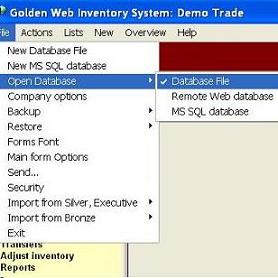
Find the IIS's folder C:/Inetpub on your server computer and create the new folder C:/Inetpub/golden. Put our ASP files in this folder and change the path to your database file in the file "config.asp". 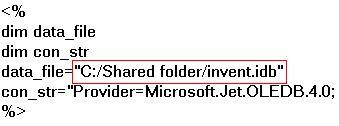
Now, you will be able to connect to the database file via Internet from other your remote computers. You can use the menu "File-Open Database- Remote Web Database" and fill out the "Web service form" : www.yourdomain.com/golden or (your IP address)/golden. 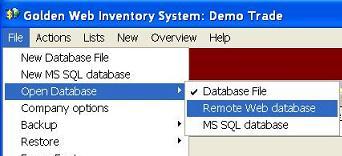 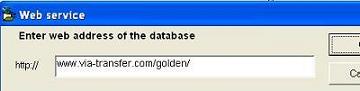
If you don't have a web server you can use any shared or dedicated Windows web hosting. You can place the database file and ASP scripts in any folder and connect to this folder using the menu" File-Open Database- Remote Web Database" from all your computers. |
 |
|
|
